AI Code Runner: Why the Answer Should Be the Artifact, Not a Code Block
2026-08-07 · Tasman Goff · Last updated 2026-08-07
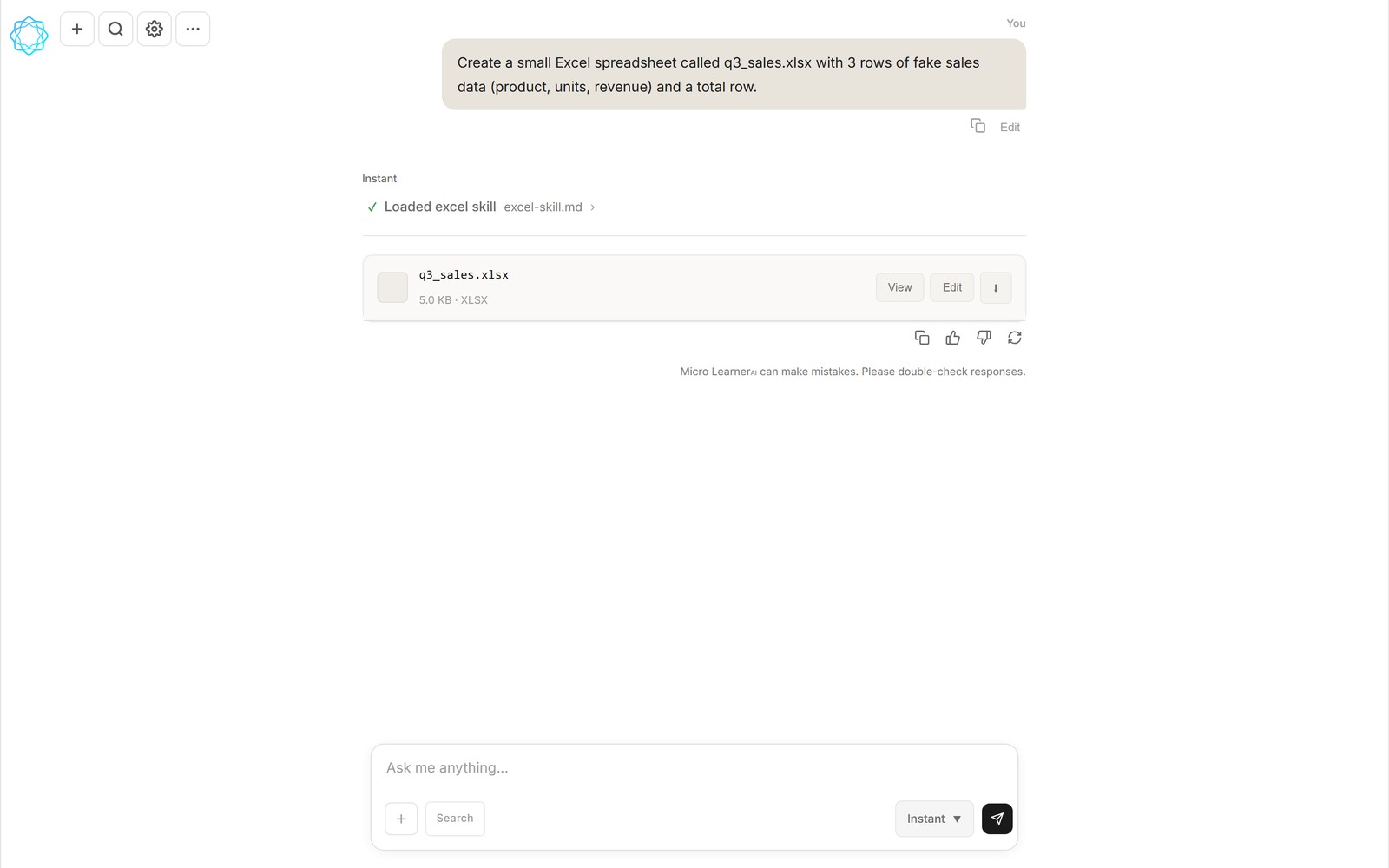
A Micro Learner AI chat that asked for a sales spreadsheet — and got a real q3_sales.xlsx file, attached to the conversation.
Most chatbots answer questions. Very few of them finish the job. The difference is one capability: whether the AI can run the code it writes, right there in the conversation. When it can, the answer stops being advice and starts being the thing you asked for — a spreadsheet that calculates, a deck you can present, an image you can download. This article is about why that gap matters so much, and how we built Micro Learner AI (currently in beta) around closing it.
The last mile nobody talks about
Ask a typical chatbot for a spreadsheet tracking your quarterly sales and you'll get something reasonable: a table in markdown, maybe a block of Python or a list of formulas to paste into Excel yourself. It looks like an answer. But notice what just happened — the work got handed back to you. You still have to open Excel, recreate the table, wire up the formulas, and fix whatever breaks along the way.
For a developer that's a minor chore. For everyone else it's the exact wall they were trying to avoid by asking an AI in the first place. The chatbot did the easy part — describing the thing — and assigned the hard part, making the thing exist, to the person least equipped to do it. A code block is not a spreadsheet. Instructions are not an app.
This is the gap that "AI that runs code" closes. Not a bigger model, not a longer answer — execution. The AI writes the code, runs it, looks at what came out, and gives you the result instead of the recipe.
What running code mid-chat actually looks like
Concretely, in Micro Learner AI it goes like this. You type a request in plain English: "Make me a spreadsheet of Q3 sales by region with totals and a chart." The AI decides code is the right tool for the job, and before anything executes you get a review-and-approve step — it shows you what it's about to run, and you choose Run, Always allow, or Cancel. Nothing executes silently.
Approve it, and a few seconds later a file card appears in the conversation: q3_sales.xlsx. Not a screenshot of a spreadsheet, not text formatted to look like one — an actual Excel file, generated by code that just ran. The card has three actions: View, to open it right there; Edit, to change it; and a download button, to take it with you. The file is attached to the conversation, so it's still there when you come back tomorrow.
That approve step matters more than it might seem. An AI executing code it wrote itself is powerful, and you should never have to take that on faith. Seeing the plan before it runs — and being able to say no — is what makes the feature trustworthy enough to use for real work.
Iteration stops being a relay race
The second-order effect is the bigger one. When the AI runs its own code, it sees its own mistakes. If a formula is wrong or a chart renders oddly, you don't copy an error message back into the chat and hope — you say "the totals column is off by a row" and the AI re-runs, checks, and fixes it. The write-run-look-fix loop that used to bounce between you and the chatbot now happens on the AI's side of the screen.
This changes what it's reasonable to ask for. "Add a column for month-over-month growth." "Make the chart a bar chart." "Now do the same thing for Q2." Each of those is one sentence, because the context — the file, the code, the previous runs — is all still in the conversation. Iterating in plain English on a real artifact is a completely different experience from iterating on a description of one.
Answers become artifacts
Once execution is in place, the pattern generalizes. The same mechanism that produces a spreadsheet produces the other things people actually need from a computer:
- Slide decks — ask for a pitch or a lesson, get a real .pptx you can open and present.
- Charts and reports — data in, a visualized chart or a PDF report out.
- Images — generated and edited in the conversation, delivered as files like .png.
- Small tools — a calculator, a converter, a tracker — working, not described.
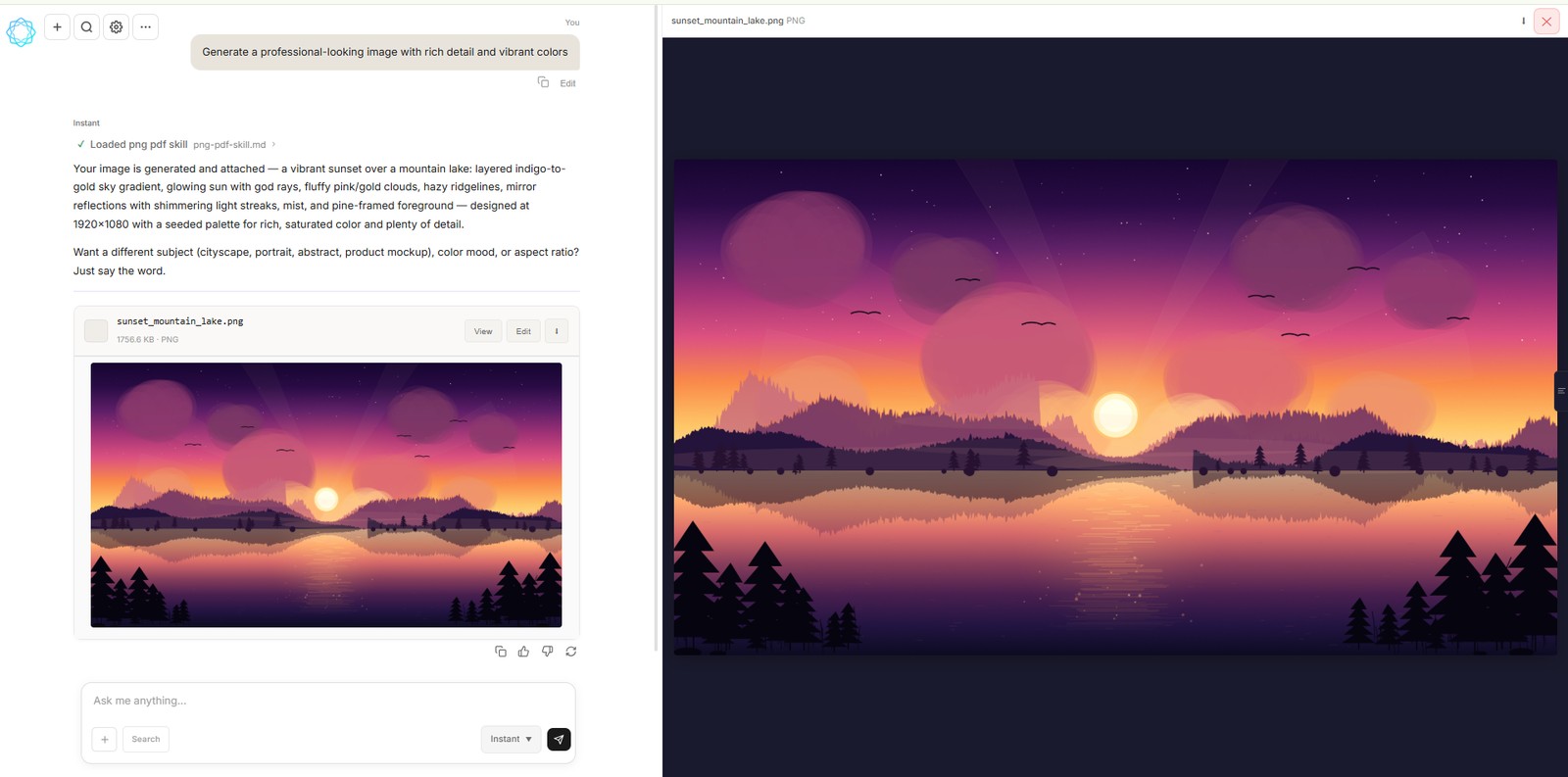
The same loop, applied to images: the chat generated sunset_mountain_lake.png and opened it in the viewer.
The screenshot above is the same idea wearing different clothes. The request was for an image; the answer was the image itself — generated, attached to the chat, open in the viewer. In every case the pattern holds: the artifact is the answer. If what you get back still needs an hour of assembly, the AI didn't really do the task.
Why this needs cheap intelligence
There's a reason most products don't do this, beyond the engineering. Running code mid-chat multiplies the model calls. A plain answer costs one call; a working artifact can cost several — write the code, run it, read the output, fix it, run it again. At the per-token prices of the most famous frontier models, that loop gets expensive fast, and a free tier becomes a marketing sentence rather than a product.
This is why Micro Learner AI runs on DeepSeek — frontier-class intelligence at a low per-token cost. The economics aren't a footnote; they're the enabling feature. They're what let us execute code in chat on a genuine free tier (usage resets every 5 hours) and a Pro plan at $12/month with roughly 4.5× the free usage, rather than reserving execution for an enterprise plan. Cheap intelligence per call is what makes an AI that runs code affordable enough to be the default way it answers.
AI code runner vs. a code interpreter
If code execution is the feature you're shopping for, the word you'll run into is code interpreter. OpenAI's is the reference point — the ChatGPT code interpreter (also called Advanced Data Analysis) runs Python in a sandbox and can produce charts and files. It's a real step up from pasting code into your own terminal, and if that's all you need, it's a fine answer.
An AI code runner goes a step further in one specific direction: the point isn't to show you the code or the reasoning, it's to hand back the finished artifact. The execution is the same idea — write, run, look, fix — but the deliverable is a file attached to the conversation, not a sandbox pane you have to copy out of. A ChatGPT code interpreter gives you a place to run code; a code runner gives you the thing you asked for.
That distinction is why Micro Learner AI calls itself a harness rather than just a code interpreter. The code execution is one stage of a longer pipeline: plan, write, run on the server, verify, and deliver a real .xlsx, .pptx, chart, PDF, or image as an artifact card in the chat. If you've used a code interpreter and found yourself wishing the output were a downloadable file instead of a cell you had to export, that's exactly the gap a code runner closes.
Frequently asked questions
What does it mean for an AI to run code?
It means the AI doesn't just write code as text for you to execute yourself — it executes the code inside the conversation, sees the result, and hands you the finished output. In Micro Learner AI that output is a real file attached to the chat: a spreadsheet, a slide deck, a chart, an image.
Can I control what code the AI runs?
Yes. Micro Learner AI uses a review-and-approve step before anything executes: you see what it's about to run and choose Run, Always allow, or Cancel. Nothing executes silently without your approval.
What files can an AI that runs code produce?
In Micro Learner AI: real .xlsx spreadsheets, .pptx slide decks, charts, PDF reports, and generated images like .png files. Each one is attached to the conversation with View, Edit, and download actions, so you can inspect it, tweak it, or take it elsewhere.
Is an AI that runs code expensive to use?
It doesn't have to be. Running code takes more model calls than plain chatting, so cost matters — Micro Learner AI runs on DeepSeek, a frontier-class model with a low per-token cost. That's what makes a free tier (usage resets every 5 hours) and a $12/month Pro plan viable while still executing code in chat.
Micro Learner AI is in beta and opening up gradually. Try it at microlearnerai.com.
New to the app? Start with how the harness works.